
On this page13
- What is an access control system?
- How do access control systems work?
- Cards, fobs, mobile or biometrics: which credential suits your site?
- How access control works with alarms, CCTV and intercoms
- Fire egress and building code rules in Victoria
- Privacy: biometrics and access logs
- What different Victorian sites need
- Maintenance: keeping doors and data working
- Questions to ask before you choose a system
- Frequently asked questions
- Get advice for your site
- About this guide
- Sources
Not sure what your site needs?
A technical consultant from our Hallam office will look at the site and recommend a system, free of charge.
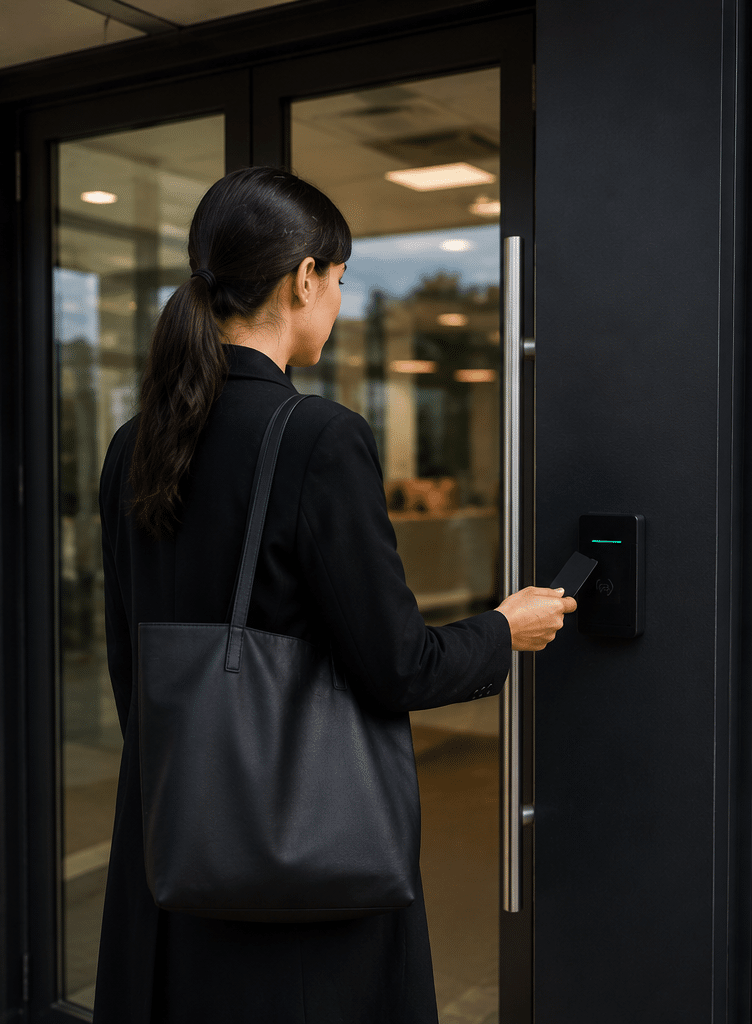
Request an assessment 1300 66 11 99An access control system decides who can open a door, when, and keeps a record of every attempt. A person presents a credential such as a card, fob, phone or fingerprint to a reader. A controller checks it against the rules for that door and time, then releases the lock or keeps it shut. This guide explains how access control systems work, how to choose a credential and how they link with alarms, cameras and intercoms. It also covers what Victorian businesses, schools and multi-tenant buildings need to sort out on fire egress, privacy and maintenance.
Key Takeaways
- Every system has five main parts: credentials, readers, controllers, locks and software. The controller makes the decision, not the reader.
- Cards and fobs suit most sites. Mobile credentials cut card handling. For organisations the Privacy Act covers, biometrics are sensitive information and generally need consent and a clear reason.
- Under the National Construction Code, doors on an exit path must open without a key from the inside, so lock choice and fail-safe behaviour are planned door by door.
- In Victoria the installer must hold a security equipment installer licence, and exit doors are essential safety measures the building owner must maintain.
What is an access control system?
An access control system is an electronic way of managing entry to doors, gates, lifts, car parks and restricted rooms. Instead of asking "who has a key?", it asks "who has permission for this door right now?"
That shift solves the main problems with keys. A key can be copied, lent or lost, and it leaves no record. A credential can be cancelled the moment a card goes missing or a contractor finishes a job, and every granted or denied attempt is logged with the person, door and time. When a staff member leaves, you remove their access in the software instead of rekeying the building.
How do access control systems work?
Every access event follows the same short sequence:
- A person presents a credential: a card, fob, remote, PIN, phone or biometric such as a fingerprint or face.
- The reader captures it and passes the data to the controller. The reader does not decide anything by itself.
- The controller checks the rules: is the credential valid, may this person use this door, and is it inside their allowed hours?
- The lock responds. If access is approved, the controller releases the electric strike, magnetic lock or electronic lock. If not, the door stays locked.
- The event is recorded. The software logs the result and can raise an alert, for example when a door is forced or held open.
The five main parts of a system
- Credentials identify the person. Most sites use a mix, covered in the next section.
- Readers sit beside the door or gate. Exposed doors need readers rated for weather and vandal resistance.
- Controllers hold the rules and make the decision. On-premise controllers keep the rules and event log locally, so doors keep working if the server or internet drops.
- Locks and door hardware secure the door: electric strikes, magnetic locks, electronic mortice locks, battery-powered wireless locks, door position sensors, exit buttons and emergency release units.
- Software is where administrators add users, set schedules and groups, and run reports, either on a local server or in the cloud.
A power supply with battery backup ties it together and decides how each door behaves when the mains fails, which matters for fire egress (see below).
On-premise systems keep the controllers and data on site. Cloud-managed systems remove the local server, so doors and sites are managed from a browser or app. The choice depends on how many sites you run, your IT policy and your internet connection. Examples include Inner Range Integriti or Tecom Challenger on premise, and Rhombus or SALTO KS in the cloud; the access control service page lists every platform Eclipse installs.
Cards, fobs, mobile or biometrics: which credential suits your site?
The credential is the part your people touch every day, so pick it for how they actually work, not for the newest feature.
| Credential | How it works | Best suited to | Watch out for |
|---|---|---|---|
| Cards and fobs | Presented to a reader, cancelled in software when lost | Most offices, schools, warehouses and clinics | Cards get lent or left behind; ask whether the card format is encrypted |
| PIN codes | Typed on a keypad, one code per person | Low-traffic internal doors, or as a second factor | Shared codes remove the record of who entered |
| Mobile credentials | A phone app acts as the key, revoked remotely | Frequent staff or contractor changes, multi-site organisations | Not every worker will use a personal phone; keep cards as a fallback |
| Biometrics (fingerprint, face) | The reader matches a biometric template | Data rooms, labs, pharmacies and doors where credential sharing is a real risk | Sensitive information under the Privacy Act; covered organisations need consent, and a privacy impact assessment is recommended for facial recognition (OAIC) |
| Licence plate recognition | A camera reads the plate as the credential | Car parks, boom gates and loading yards | Pair with an intercom for visitors and exceptions |
Most sites end up with more than one: cards or fobs for staff, time-limited mobile passes for contractors, and biometrics only on the one or two doors where the person matters more than the card.

How access control works with alarms, CCTV and intercoms
Access control is most useful when it is connected to the other security systems on the site.
Alarms. Some panels combine intruder detection and access control in one controller. Eclipse's service page describes Inner Range Integriti and Inception, and Tecom Challenger, working this way: a valid badge disarms the area on the way in, and the last person out arms it. See our guide to commercial alarm systems if you are planning a new panel.
CCTV. When a door is forced or held open, the system can bring up the camera that covers it, so a manager or monitoring operator sees the event, not just an alarm code. Plan cameras and doors together; see our security camera systems service.
Intercoms. An intercom lets reception see a visitor and release the door from a desk or phone, while the access system logs the release. At the Belgrave commuter car park, Eclipse delivered Tecom access control, Dallas Delta intercoms and Axis cameras as one system. Our intercom installation guide covers choosing intercoms for apartments and businesses.
Fire egress and building code rules in Victoria
Locking a door electronically must never trap people inside.
Exit doors must open without a key from the inside
The National Construction Code says a door in a required exit, or on the path of travel to one, "must be readily openable without a key from the side that faces a person seeking egress" (ABCB, NCC 2025 Volume One, clause D3D26). Victoria adopted NCC 2025 on 1 May 2026 (HIA). Existing buildings were approved under earlier editions, so check the occupancy permit and ask your building surveyor.
Fail-safe and fail-secure locks
A fail-safe lock unlocks when it loses power; a fail-secure lock stays locked. The NCC allows certain exit doors to be locked if they have "a fail-safe device which automatically unlocks the door upon the activation of any sprinkler system ... or smoke, or any other detector system" meeting AS 1670.1 and installed throughout the building (D3D26(3)(d)). In practice, this means the access control and fire detection systems are connected and tested together.
A Victorian variation for early childhood centres
For an exit door in an early childhood centre that does not open to an enclosed outdoor space complying with G1D4, the Victorian version of D3D26(1) requires the opening device to be located between 1.5 m and 1.65 m above the floor and to return the door "to the fully closed position immediately after each opening". That affects where readers and exit devices go.
Exit doors are essential safety measures
Exit doors and paths of travel to exits are essential safety measures for every building other than a house or outbuilding. The owner must keep them working, prepare an annual essential safety measures report and keep maintenance records. Occupiers must keep exits "readily accessible, functional and clear of obstructions" (Building and Plumbing Commission, Essential safety measures).
Adding electric locks to an exit door changes how it operates, so involve a building surveyor before the work starts.
Standards for the system itself
IEC 60839-11-2 sets "requirements for planning, installation, commissioning, maintenance, and documentation" of electronic access control systems (BSI, BS EN 60839-11-2). Standards Australia has adopted IEC 60839-11-1 as AS/NZS IEC 60839.11.1:2019 (Security Electronics and Networks, 2020), and Eclipse states that it installs to the AS/NZS IEC 60839.11 series.
Privacy: biometrics and access logs
Event logs show when a named person entered and left, and biometric readers store templates. Both are personal information.
Biometrics are sensitive information
The Office of the Australian Information Commissioner says that under the Privacy Act 1988 "your biometric information is sensitive information", so a covered organisation "must first ask for your consent, with some exceptions" (OAIC, Biometric scanning).
The OAIC's facial recognition guidance says that "generally, implied consent should not be relied on" for biometric information, asks whether the purpose can be achieved by less intrusive means, and recommends a privacy impact assessment (OAIC, Facial recognition technology guide, updated 29 July 2026).
Who the Privacy Act covers
The Privacy Act covers Australian Government agencies, organisations with an annual turnover above $3 million, and some others. Health service providers are covered regardless of turnover, so clinics should assume it applies (OAIC, Small business). Employee records have their own rules, so get advice before collecting staff biometrics.
Victorian government schools
Victorian government schools follow state rules. The Department of Education says privacy obligations "do not prohibit the use of biometric technologies in schools", but a school must first contact the department's Privacy team, check the software has been security-assessed or complete a privacy impact assessment, review the contract, and consult the school community (Department of Education Victoria, Biometric information and technologies, updated 10 July 2025).
The department also notes that "the least intrusive method should be preferred", which for most school doors points to cards or fobs rather than fingerprints.
Protect and prune the logs
Australian Privacy Principle 11 requires covered organisations to protect personal information from misuse and unauthorised access, and to destroy or de-identify it once it is no longer needed (OAIC, Australian Privacy Principles). Give each administrator a separate login, limit who can export reports and set a retention period for event logs. This is general information, not legal advice.
What different Victorian sites need
Schools and early learning centres. Front office control of visitor entry, gates on a schedule, lockdown in one action from the office, and wireless locks on internal doors where cabling every classroom is impractical. Eclipse lists SALTO wireless locks at Victorian schools including St Francis Xavier Berwick and Yarra Valley Grammar. Our guide to school security systems covers the wider picture.
Multi-tenant and strata buildings. Separate user groups per tenant, lift control so each credential reaches only its floors, car park rules and a process for lost fobs and tenant changes. Decide early who administers the system: the owners corporation, the building manager or each tenant.
Warehouses, factories and food production. Loading docks, roller doors, boom gates and high-value stores can take the same credentials, schedules and audit trail as the front door. Food manufacturers also manage hygiene zones; see our guide to food manufacturing access solutions.
Maintenance: keeping doors and data working
Maintenance covers the doors, the fire interface and the data:
- Door hardware. Strikes and magnetic locks release cleanly, closers pull doors shut, door sensors report correctly, and exit buttons and emergency release units work.
- Power. Backup batteries are tested and each door behaves as designed during a mains failure.
- Fire interface. Doors relying on a fail-safe release unlock when the fire system activates. Check whether that release is listed in the building's essential safety measures.
- Software and users. Departed staff and expired contractors are removed, administrator accounts reviewed, firmware kept supported and the database backed up.
- Licensing. Victoria Police lists installing, repairing, servicing or maintaining "electric, electro-mechanical, magnetic, or biometric access control devices" as security equipment installer work under the Private Security Act 2004 (Victoria Police, Private security licence activities). Ask any installer or service technician for their licence number.
For a servicing plan, see our security maintenance and installation service and our guide to security system maintenance.
Questions to ask before you choose a system
- Which doors, gates and lifts need control, and how must each behave in a power failure and a fire?
- Which credentials will your staff, contractors and visitors actually use?
- Should the system share a controller with the alarm and link to cameras and intercoms?
- If biometrics are proposed, what is the reason, and what is the fallback for people who decline?
- Who will administer users and logs, how long will logs be kept, and is the installer licensed in Victoria?
Frequently asked questions
Do access control systems work during a power cut?
They should, if designed for it. Controllers and locks run from power supplies with backup batteries, and each door is set as fail-safe or fail-secure. Doors on an exit path must still let people out.
Can phones replace access cards?
For many sites, yes. Mobile credentials can be issued and revoked remotely. Most businesses keep cards or fobs for staff who do not want to use a personal phone, and for visitors.
Can a Victorian school use fingerprint or face readers?
Yes, but a government school must first work through the Department of Education's steps: the Privacy team, a security assessment or privacy impact assessment, a contract review and community consultation. A non-government school covered by the Privacy Act needs consent and a clear reason.
Does an access control system need the internet?
Not always. On-premise controllers work locally without internet. Cloud-managed systems need a connection for remote management and updates.
Get advice for your site
The right access control system depends on your doors, your people and the rules that apply to your building. Eclipse Security designs, installs and maintains access control with its own licensed technicians for businesses, schools and multi-tenant buildings across Melbourne and Victoria. For a door-by-door view of what your site needs, request a free security assessment.
About this guide
Prepared by the Eclipse Security team, licensed security installers based in Hallam, Victoria, and checked against the sources below on 25 November 2026. To suggest a correction, contact us.
Sources
- Victoria Police, Private security licence activities, updated 2 November 2026.
- Australian Building Codes Board, NCC 2025 Volume One, Part D3 Construction of exits, clause D3D26 and Victorian variation.
- Housing Industry Association, NCC 2025 adopted in Victoria 1 May 2026.
- Building and Plumbing Commission (Victoria), Essential safety measures.
- BSI, BS EN 60839-11-2:2015 Electronic access control systems. Application guidelines (identical to IEC 60839-11-2:2014).
- Security Electronics and Networks, Standards Australia announces adoption of IEC 60839 for access control, 6 April 2020.
- Office of the Australian Information Commissioner, Biometric scanning; Small business; Read the Australian Privacy Principles.
- Office of the Australian Information Commissioner, Facial recognition technology: a guide to assessing the privacy risks, updated 29 July 2026.
- Department of Education Victoria, Policy and Advisory Library, Biometric information and technologies, updated 10 July 2025.
- Eclipse Security, Access control systems service page (platforms and projects).