
On this page20
- What Is Security System Maintenance?
- Why Security System Maintenance Matters in Australia
- What Should Be Included in a Security System Maintenance Visit?
- Why the “Why” Matters: Reliability, Evidence and Response
- Security System Maintenance for Alarms
- Security System Maintenance for CCTV Cameras
- Security System Maintenance for Access Control
- Cyber Security Checks for Modern Security Systems
- Recommended Security System Maintenance Schedule
- DIY vs Professional Security System Maintenance
- Numbered Security System Maintenance Checklist
- Common Warning Signs Your System Needs Maintenance
- Security System Maintenance for Australian Businesses
- Security System Maintenance for Homes
- Maintenance After Renovations, Moves or Staff Changes
- Maintenance Reports: What You Should Receive
- People Also Ask: Security System Maintenance in Australia
- Expert Q&A: High-Value Security System Maintenance Questions
- Choosing a Security System Maintenance Provider
- Conclusion: Make Maintenance Part of Your Security Plan
Not sure what your site needs?
A technical consultant from our Hallam office will look at the site and recommend a system, free of charge.
Request an assessment 1300 66 11 99Security system maintenance is one of the simplest ways to keep alarms, CCTV, access control and monitoring equipment working when it matters most. In Australia, I have seen many homes, shops, warehouses, schools and offices invest in quality equipment, yet lose reliability because batteries, firmware, sensors, cameras or network settings were not checked often enough.
A security system is not a set-and-forget asset. Heat, dust, storms, power outages, renovations, staff changes, Wi-Fi issues and everyday wear can all affect performance. Therefore, a planned maintenance routine helps reduce false alarms, improve image quality, protect stored footage, and give owners more confidence that their system is ready during an incident.
Table of Contents
- What security system maintenance means
- Why maintenance matters in Australia
- What should be included in a maintenance visit
- Recommended maintenance schedule
- Alarm, CCTV and access control maintenance
- Cyber security and smart device checks
- Compliance and admin checks in Australia
- DIY vs professional maintenance comparison
- Numbered security system maintenance checklist
- Common warning signs your system needs service
- People Also Ask
- Expert Q&A
- Conclusion
What Is Security System Maintenance?
Security system maintenance is the planned inspection, testing, cleaning, updating and repair of alarms, CCTV cameras, access control, sensors, batteries, cabling, monitoring links and software. It helps confirm each part works correctly, reduces false alarms, and keeps the system reliable for Australian homes and businesses.
Why Security System Maintenance Matters in Australia
Security equipment works in real environments, not in perfect lab conditions. In Australia, systems may face summer heat, coastal salt air, heavy rain, power interruptions, dust, insects and building movement. As a result, even well-installed equipment can drift out of alignment or lose performance over time.
For example, a CCTV camera may still appear online, but its lens may be dirty, its night vision may be blocked by cobwebs, or its field of view may have changed after new signage was installed. Likewise, an alarm sensor may still trigger, yet its backup battery may be close to failure.
From my experience, many maintenance issues are small at first. However, they become serious when ignored. A weak battery can create random faults. A full recorder can overwrite useful footage too quickly. A changed internet router can stop remote viewing. A staff member leaving a business can also create access control risks if their credentials are not removed.
Regular security system maintenance helps prevent these gaps before they become expensive or stressful.
What Should Be Included in a Security System Maintenance Visit?
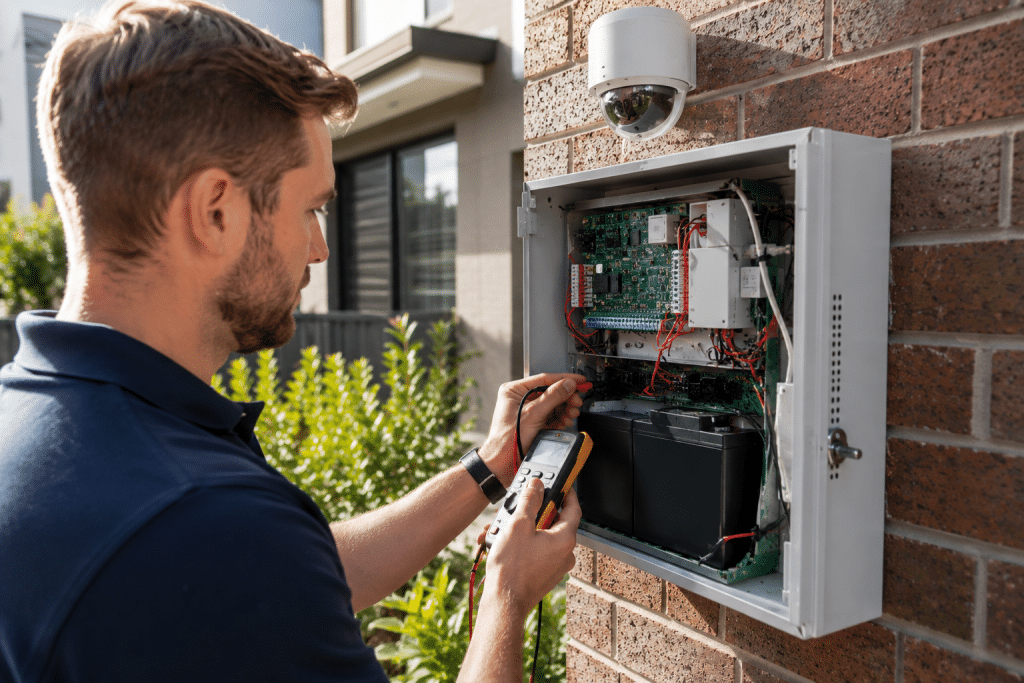
A proper maintenance visit should test the complete security chain. That means the technician should not only look at hardware. They should also check settings, alerts, users, recordings, power, network connections and monitoring pathways.
A good visit usually includes:
- Visual inspection of all visible equipment
- Cleaning of camera lenses, housings and detector areas
- Alarm panel health check
- Sensor test and zone walk test
- Siren, strobe and keypad checks
- Backup battery testing
- CCTV image quality review
- Recorder storage and playback check
- Remote access test
- Access control reader and lock test
- User code and credential review
- Time, date and notification settings check
- Firmware and software update review
- Documentation of faults and recommendations
In addition, the technician should explain what was found in plain language. This matters because non-technical owners need to know whether an issue is urgent, optional or simply something to monitor.
Why the “Why” Matters: Reliability, Evidence and Response
Security system maintenance is not only about keeping devices clean. More importantly, it supports three outcomes: reliability, evidence and response.
First, reliability means the system detects what it should detect. If a reed switch, motion detector or camera is poorly positioned, the system may miss activity. However, if it is too sensitive, it may create false alarms.
Second, evidence means CCTV footage is clear, time-stamped and stored correctly. A camera that is too dark, too blurry or aimed too high may not help after an incident. Therefore, maintenance should include live view and playback checks.
Third, response means alerts reach the right people. For monitored systems, communication paths need testing. For self-monitored systems, mobile notifications, app access and contact details should be reviewed.
According to the Australian Security Industry Association Limited licensing guidance, technical security work such as installing, maintaining, repairing or servicing security equipment may require appropriate licensing depending on the state or territory. This is why businesses should check that their provider is suitable for the work being performed.
Security System Maintenance for Alarms
Alarm systems are usually the first line of active detection. They can include motion sensors, door contacts, glass-break sensors, panic buttons, keypads, sirens and communication modules.
During alarm maintenance, the technician should test each zone. They should also confirm that the alarm panel correctly identifies the location of the triggered device. This helps users and monitoring centres respond faster.
Backup batteries are especially important. Many alarm systems continue operating during power outages, but only if the battery is healthy. In Australia, storms and local power interruptions can expose weak batteries quickly. Therefore, battery testing should be part of every scheduled service.
Common alarm maintenance tasks include:
- Testing each detector
- Checking tamper switches
- Testing sirens and strobes
- Checking keypad buttons and display
- Testing backup batteries
- Reviewing alarm event history
- Confirming entry and exit delays
- Testing mobile or monitoring communication
- Checking user codes
- Removing old users
A simple rule is this: if the alarm has not been tested recently, you do not truly know whether it will perform under pressure.
Security System Maintenance for CCTV Cameras
CCTV maintenance focuses on image quality, coverage, recording, storage and access. This is important because CCTV is often judged only after an incident. By then, it is too late to fix a blurry lens or failed hard drive.
A technician should inspect each camera view and ask practical questions. Can you see faces at entrances? Are number plates visible where required? Is night vision working? Are trees, signs or stock displays blocking the view? Is the image affected by glare?
CCTV maintenance should also include playback testing. Live view alone is not enough. A camera can appear online while recording has failed due to storage, recorder or configuration issues.
In addition, camera privacy should be handled carefully. The Office of the Australian Information Commissioner explains that security cameras can raise privacy considerations, especially where images or identities are collected. Its security cameras privacy guidance is a useful starting point for understanding general privacy issues. This article is not legal advice, so businesses should treat privacy checks as administrative support and seek qualified advice where needed.
Security System Maintenance for Access Control
Access control systems manage who can enter a site, when they can enter, and which areas they can access. They may include card readers, fobs, PIN pads, electronic locks, exit buttons, intercoms and management software.
Maintenance is essential because staff, contractors and tenants change often. If old users remain active, the system may create an avoidable security risk.
A good access control maintenance visit should review:
- Active users
- Lost or unreturned cards
- Door schedules
- Lock operation
- Reader response
- Exit buttons
- Emergency release functions
- Door forced and door held alerts
- Audit logs
- Admin permissions
From my experience, access control databases often become messy over time. Therefore, a scheduled user audit is just as important as hardware testing.
Cyber Security Checks for Modern Security Systems
Modern security systems are increasingly connected to the internet. CCTV cameras, alarm apps, intercoms and smart locks may use Wi-Fi, mobile networks or cloud platforms. This makes maintenance partly a cyber security task.
The Australian Cyber Security Centre notes that internet-connected devices, including security cameras, can be vulnerable when they are not designed or maintained securely. Its IoT device security advice recommends practical steps such as securing devices, changing default passwords and applying updates.
For security system maintenance, cyber checks may include:
- Changing default passwords
- Reviewing admin users
- Checking firmware versions
- Removing unused accounts
- Testing remote access
- Checking network settings
- Confirming time synchronisation
- Reviewing cloud account security
- Checking whether multi-factor authentication is available
- Confirming that old phones or staff accounts no longer have access
This matters because a reliable system should protect both the physical site and the digital access points connected to it.
Recommended Security System Maintenance Schedule
The right schedule depends on the site, risk level and equipment type. However, most Australian homes and small businesses benefit from at least an annual service. Higher-risk sites may need quarterly or six-monthly checks.
| Site Type | Suggested Frequency | Why It Matters |
| Standard home alarm and CCTV | Every 12 months | Helps confirm batteries, cameras and alerts still work |
| Small retail shop | Every 6–12 months | Reduces false alarms and checks footage quality |
| Warehouse or industrial site | Every 3–6 months | Dust, vibration and large areas increase fault risk |
| School or childcare facility | Every 3–6 months | Access control, cameras and incident review are sensitive |
| Multi-site business | Quarterly or planned program | Keeps settings consistent across locations |
| High-risk commercial site | Quarterly or more often | Supports faster fault detection and response readiness |
These are general estimates, not legal or insurance requirements. However, they are practical starting points for maintenance planning.
DIY vs Professional Security System Maintenance
Some simple checks can be done by the owner. However, technical servicing should be handled by a suitable professional, especially where licensing, monitoring, access control or electrical work may be involved.
| Task | DIY Check | Professional Maintenance |
| Clean visible camera lens | Yes, if safely accessible | Yes |
| Check app login | Yes | Yes |
| Test alarm communication | Sometimes | Yes |
| Replace alarm backup battery | Usually no | Yes |
| Add or remove users | Sometimes | Yes, especially for businesses |
| Adjust CCTV camera angle | Sometimes | Yes, if height or compliance risk exists |
| Firmware review | Sometimes | Yes |
| Diagnose faults | Limited | Yes |
| Review privacy or admin records | Basic review | Yes, with qualified advice if required |
| Test monitored alarm pathway | Usually no | Yes |
In short, DIY checks are useful between visits. However, they should not replace structured security system maintenance by a trained technician.
Numbered Security System Maintenance Checklist
Use this checklist before, during or after a scheduled service.
- List all security equipment. Include alarms, cameras, recorders, access control, intercoms, sensors, sirens and apps.
- Check visible damage. Look for cracked housings, loose brackets, blocked sensors, water marks or exposed cabling.
- Test every alarm zone. Confirm each detector reports correctly to the panel.
- Review backup batteries. Ask for battery condition and replacement recommendations.
- Check sirens and strobes. Confirm they operate safely and as expected.
- Review CCTV live view. Make sure each camera shows the right area.
- Test CCTV playback. Confirm footage is being recorded and can be retrieved.
- Check night vision. Look for glare, insects, reflections or blocked infrared lighting.
- Review storage duration. Confirm the recorder keeps footage for a practical period.
- Test remote access. Check mobile apps, notifications and authorised users.
- Audit user codes and cards. Remove old staff, contractors or tenants.
- Check firmware and software. Review updates before applying them.
- Confirm monitoring contacts. Make sure phone numbers and escalation steps are current.
- Document faults. Record what was found, what was fixed, and what needs follow-up.
- Book the next service. Maintenance works best when it is planned, not reactive.
Common Warning Signs Your System Needs Maintenance
You should book security system maintenance if you notice repeated faults, false alarms, poor footage or unreliable access. Small warning signs often point to larger problems.
Look out for:
- Random beeping from the alarm panel
- Low battery messages
- Frequent false alarms
- Cameras dropping offline
- Blurry or dark video
- Missing recordings
- Wrong time or date on footage
- App notifications not arriving
- Users unable to enter approved areas
- Doors not locking correctly
- Intercom calls failing
- Recorder fan noise or overheating
- “Communication fail” messages
- Staff accounts that should no longer exist
If these problems appear, do not wait for the next incident. A service visit can often find the cause quickly.
Security System Maintenance for Australian Businesses
Australian businesses should think about maintenance as part of risk management. A system that works well supports staff safety, asset protection, incident review and daily operations.
For example, a retail store may use CCTV to review theft, disputes and safety incidents. A warehouse may need access control to separate public, staff and restricted areas. A medical, education or professional office may need to manage privacy more carefully because cameras, access records and visitor logs can involve personal information.
Therefore, business security system maintenance should include both technical checks and administrative checks. Technical checks confirm devices work. Administrative checks confirm the system is still aligned with users, policies and site operations.
Useful admin questions include:
- Who has admin access?
- Are former staff removed?
- Are camera signs still visible where used?
- Are retention settings appropriate?
- Are incident export procedures documented?
- Are monitoring contacts current?
- Are maintenance reports stored?
- Are passwords managed safely?
These are not legal instructions. Instead, they are practical governance steps that can support better management.
Security System Maintenance for Homes
Homeowners often focus on alarms and cameras. However, the same principles apply. A home system should detect entry, record useful footage, send alerts and remain secure from unwanted access.
For homes, the most common issues are weak batteries, changed Wi-Fi details, app login problems, dirty cameras, blocked views and outdated user codes.
A yearly service is usually a sensible baseline. In addition, homeowners should do quick monthly checks. For example, confirm the app opens, check that cameras are online, and test that notifications reach the right phone.
Also, remember that renovations can affect coverage. New fences, sheds, trees, lighting, doors or furniture can change how sensors and cameras perform.
Maintenance After Renovations, Moves or Staff Changes
Security systems should be reviewed after any major change. This is because the original design may no longer match the site.
Book a review after:
- Renovating a home or business
- Moving walls, doors or windows
- Changing internet providers
- Replacing a router
- Adding new staff
- Ending a tenancy
- Losing access cards or keys
- Installing new lighting
- Changing stock layout
- Adding outdoor structures
- Moving high-value assets
In many cases, the equipment may still be suitable. However, settings, users or camera angles may need adjustment.
Maintenance Reports: What You Should Receive
A professional provider should give a clear maintenance summary. This does not need to be complicated, but it should be useful.
A good report may include:
- Date of service
- Equipment checked
- Tests completed
- Faults found
- Repairs completed
- Parts replaced
- Battery condition
- CCTV recording status
- Recommendations
- Photos where useful
- Next service suggestion
This report helps owners track the history of their system. It also supports budgeting because you can see which parts may need replacement soon.
People Also Ask: Security System Maintenance in Australia
How often should security system maintenance be done?
Most Australian homes should consider annual security system maintenance, while businesses may need checks every 3 to 12 months depending on risk, equipment and site activity. High-use sites, monitored alarms and access control systems usually benefit from more frequent servicing.
Can I maintain my security system myself?
You can do simple checks such as cleaning accessible camera lenses, testing app access and reviewing visible faults. However, technical testing, battery replacement, monitoring checks and access control servicing should be handled by a suitable professional.
What happens if I do not maintain my alarm system?
An unmaintained alarm can produce false alarms, miss events, lose communication or fail during a power outage. Over time, batteries weaken, sensors move, and settings become outdated.
Does CCTV need maintenance?
Yes, CCTV needs regular maintenance because cameras, recorders, storage and network settings can all fail or degrade. A camera may look fine from the outside but still record poor footage or no footage at all.
Is security system maintenance required by law in Australia?
Requirements vary by state, territory, industry, insurance policy and system type. Treat compliance as an administrative check, not legal advice, and ask a licensed security provider or qualified adviser if you are unsure.
Expert Q&A: High-Value Security System Maintenance Questions
1. What is the most overlooked part of security system maintenance?
The most overlooked part is usually user management. Businesses often forget to remove old staff, contractors or tenants from alarm codes, access cards and app accounts. This creates a security gap even when the hardware is working.
2. Why does my alarm keep showing a low battery fault?
A low battery fault usually means the backup battery is weak or no longer holding charge. It may also appear after power interruptions. A technician can test the battery, charging circuit and panel health before replacing parts.
3. How long should CCTV footage be stored?
There is no single storage period that suits every site. Storage depends on camera count, resolution, frame rate, recorder capacity and business needs. During maintenance, the provider should confirm how many days of footage are actually available.
4. Should firmware always be updated immediately?
Not always. Updates can improve security and performance, but they should be reviewed carefully. A good technician checks compatibility, backup settings and manufacturer guidance before making changes.
5. What should I ask a maintenance provider before booking?
Ask whether they service your system brand, whether they hold suitable licensing for your state or territory, what tests are included, whether you will receive a report, and how urgent faults are handled. Also ask whether they can review alarms, CCTV, access control and remote access together.
Choosing a Security System Maintenance Provider
When choosing a provider, look for practical experience, clear reporting and suitable licensing. Also, ask whether the provider can explain issues without jargon. This is important because owners should understand what they are approving.
A good provider should:
- Inspect the full system, not only one device
- Explain urgent and non-urgent issues
- Provide clear maintenance records
- Understand Australian conditions
- Check cyber and user access risks
- Avoid exaggerated promises
- Recommend repairs based on evidence
- Help plan future upgrades when needed
In addition, choose a provider that understands both residential and commercial sites. A home alarm, a retail CCTV system and a warehouse access control system all need different maintenance priorities.
Conclusion: Make Maintenance Part of Your Security Plan
Security system maintenance helps keep alarms, CCTV, access control and connected devices reliable. It reduces false alarms, improves footage quality, supports safer access management and helps Australian homes and businesses identify faults before they become serious.
The best approach is simple: test regularly, document issues, remove outdated users, check recordings, review batteries and book professional servicing at sensible intervals. As a result, your system is more likely to work when you need it.
For practical support with alarms, CCTV, access control and ongoing servicing, speak with trusted Australian security system specialists who can help assess your site and plan a maintenance routine that fits your needs.