
On this page50
- What Are School Security Systems?
- Why School Security Systems Matter in Australia
- What Should a School Security System Include?
- Why a Layered School Security Strategy Works Better
- CCTV and Security Cameras for Schools
- Camera Placement Matters
- Avoiding Blind Spots
- Access Control for Australian Schools
- Why Access Control Is Valuable
- Intrusion Alarms and Alarm Monitoring
- Local Alarm vs Monitored Alarm
- Intercoms and Visitor Entry Management
- Duress and Emergency Communication Systems
- School Security Systems During Different Times of Day
- Before School
- During School Hours
- After School
- Evenings and Weekends
- Overnight and Holidays
- Integrated vs Stand-Alone School Security Systems
- Privacy and Responsible CCTV Management
- Physical and Cyber Security Working Together
- Conducting a School Security Risk Assessment
- School Security Systems Implementation Checklist
- 1. Define the Problems First
- 2. Map the Campus
- 3. Review Existing Infrastructure
- 4. Identify Different User Groups
- 5. Determine Response Procedures
- 6. Review Privacy and Administrative Requirements
- 7. Design the System Around Risks
- 8. Test Before Full Handover
- 9. Train Relevant Staff
- 10. Schedule Ongoing Reviews
- Reducing False Alarms and Unnecessary Alerts
- Maintenance Is Part of School Security
- Planning School Security Systems for Future Growth
- Choosing a School Security Provider
- People Also Ask About School Security Systems
- What security systems should Australian schools have?
- Are security cameras allowed in Australian schools?
- Is access control better than traditional keys for schools?
- Do schools need 24/7 alarm monitoring?
- School Security Systems Q&A
- 1. Should CCTV and access control be integrated?
- 2. How often should a school's security system be reviewed?
- 3. How can schools manage access for contractors?
- 4. Should security cameras use cloud or on-site recording?
- 5. What is the biggest mistake schools make when upgrading security?
- Conclusion: Building Practical School Security Systems
Not sure what your site needs?
A technical consultant from our Hallam office will look at the site and recommend a system, free of charge.
Request an assessment 1300 66 11 99School Security Systems are becoming an increasingly important part of how Australian schools protect students, staff, visitors, buildings, equipment and sensitive areas. However, effective security is not simply about installing more cameras or stronger locks. Schools need a coordinated system that combines technology, sensible access rules, monitoring, staff procedures and regular maintenance.
Every school is different. A small primary school with one main entrance has different security needs from a large secondary college with several buildings, sports facilities, workshops, car parks and after-hours community use.
Therefore, the best approach starts by identifying risks before choosing equipment.
A well-designed security strategy can help a school detect unusual activity, control who can enter restricted areas, respond to alarms, review incidents and protect facilities outside normal school hours. At the same time, schools must consider privacy, authorised access to security information and the effect security measures have on students and the wider school community.
This guide explains how School Security Systems work, what Australian schools should consider and how individual security technologies can work together as one practical solution.
What Are School Security Systems?
School Security Systems are coordinated technologies and procedures used to protect students, staff, visitors, buildings and school assets. In Australia, they commonly combine CCTV, access control, intrusion alarms, intercoms, monitored alerts and documented response procedures, designed around each campus's risks, privacy duties and daily operating patterns.
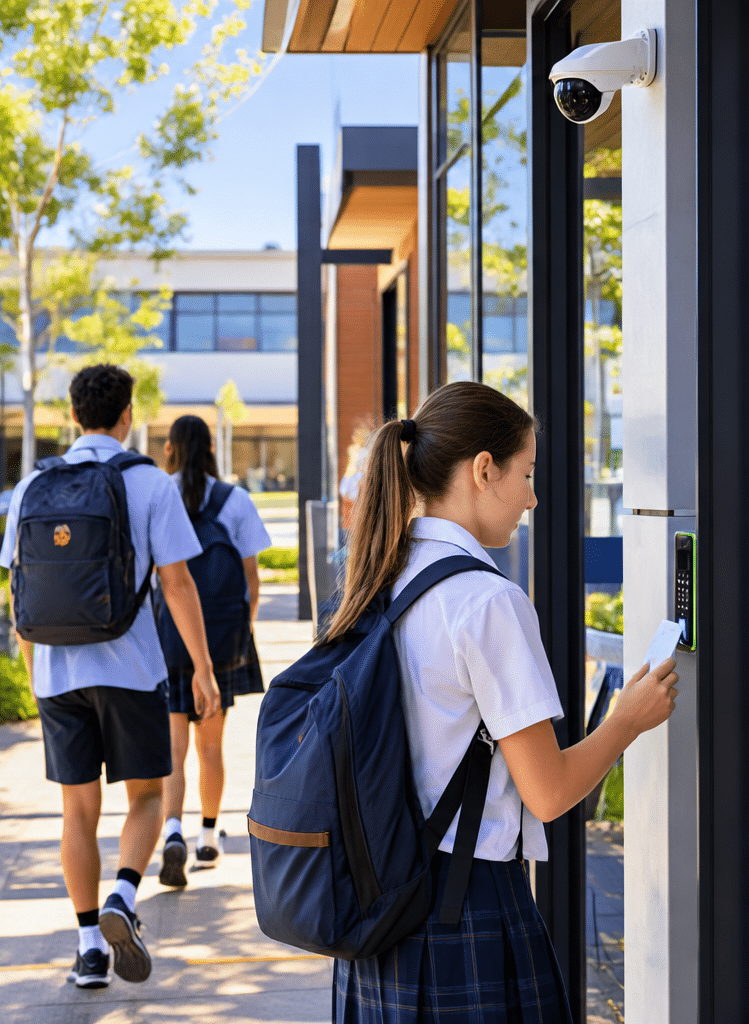
Table of Contents
- Why School Security Systems Matter in Australia
- What Should a School Security System Include?
- Why a Layered Security Strategy Works Better
- CCTV and Security Cameras for Schools
- Access Control for Australian Schools
- Intrusion Alarms and Alarm Monitoring
- Intercoms and Visitor Entry Management
- Duress and Emergency Communication Systems
- School Security Systems During Different Times of Day
- Integrated vs Stand-Alone Security Systems
- Privacy and Responsible CCTV Management
- Physical and Cyber Security Working Together
- School Security Risk Assessment
- School Security Systems Implementation Checklist
- Reducing False Alarms and Unnecessary Alerts
- Maintenance and Testing
- Planning for Future School Growth
- People Also Ask About School Security Systems
- School Security Systems Q&A
- Conclusion
Why School Security Systems Matter in Australia
Schools are unusual environments from a security perspective.
Unlike a standard office, schools may have hundreds or thousands of people entering, leaving and moving between different areas throughout the day. These people can include students, teachers, administrative employees, maintenance staff, contractors, parents, carers, delivery drivers and visitors.
Furthermore, campuses may contain valuable technology, science equipment, computers, audiovisual equipment, sporting facilities and other assets.
The risk profile also changes according to the time of day.
During school hours, visitor control and awareness around entrances may be priorities. After hours, intrusion, vandalism, theft and unauthorised building access can become more important.
Australian education guidance reflects this layered approach. Victorian Department of Education crime-prevention guidance, for example, describes physical, electronic and procedural security measures that can help deter, deny, delay or detect criminal activity. Examples include locks, lighting, CCTV, access control, intrusion detection, visitor management and incident-response procedures. Victorian Department of Education crime-prevention guidance
This is an important distinction.
A security camera is a useful tool, but a camera by itself is not a complete security strategy.
Similarly, an access card can restrict a doorway, yet it cannot automatically address every possible form of unauthorised entry.
The strongest School Security Systems therefore use different controls for different risks.
What Should a School Security System Include?
A complete system does not necessarily require every security technology available.
Instead, the design should reflect the school's actual environment.
Common components include:
- CCTV security cameras
- intrusion alarm systems
- electronic access control
- monitored security alarms
- video or audio intercoms
- visitor-entry controls
- duress devices
- perimeter detection
- door and window contacts
- security lighting
- central security management software
- documented incident-response procedures
- system maintenance and testing
The important question is not, "How much equipment can we install?"
A better question is:
What risk is each security control intended to reduce?
For example, if a school experiences repeated unauthorised access through a particular entrance, simply installing additional cameras may not resolve the underlying problem.
The school may instead need a combination of controlled entry, intercom verification, improved door hardware, appropriate CCTV coverage and clearer visitor procedures.
Consequently, equipment selection should follow risk assessment rather than lead it.
Why a Layered School Security Strategy Works Better
From a practical security-design perspective, one of the most useful principles is layered security.
Layered security means using several complementary controls so that the failure or limitation of one does not leave the entire site unprotected.
Imagine an unauthorised person approaching a restricted administration building.
Several security layers might operate:
- Site design and signage help direct visitors towards the correct entrance.
- Access-controlled doors limit entry to authorised users.
- An intercom allows staff to communicate with an unknown visitor.
- CCTV provides visual information about the entrance.
- Door monitoring identifies a forced or unusually held-open door.
- An alarm or security notification may be generated when required.
- Staff follow a predefined response procedure.
No individual technology performs every task.
Instead, each element contributes to a wider security process.
This is why School Security Systems should be designed as operational systems rather than collections of unrelated devices.
CCTV and Security Cameras for Schools
CCTV is one of the most recognisable components of school security.
Security cameras can support:
- observation of selected entrances
- coverage of external areas
- investigation of reported incidents
- after-hours site awareness
- verification of certain alarm events
- monitoring of valuable or restricted facilities
- evidence collection where permitted
However, simply increasing the number of cameras does not necessarily improve security.
Camera Placement Matters
Each camera should have a clear purpose.
For instance, a camera intended to identify people entering a building may require a different position and field of view from one designed to provide general awareness of a car park.
Lighting is also important.
Poor lighting, glare, direct sunlight, heavy shadows or unsuitable camera placement can reduce the usefulness of recorded images.
Therefore, schools should consider:
- required field of view
- expected viewing distance
- lighting conditions
- camera mounting height
- environmental exposure
- image quality
- recording requirements
- network capacity
- storage requirements
- authorised access to footage
In practice, useful camera coverage is usually more valuable than simply maximising camera quantity.
Avoiding Blind Spots
Campus layouts can make surveillance challenging.
Buildings, trees, temporary classrooms, covered walkways and other structures can create areas that are difficult to observe.
Schools should therefore review camera coverage periodically.
For example, vegetation may grow and partially obstruct a camera that previously had a clear view. New buildings can also change existing sightlines.
Security planning should adapt when the physical campus changes.
Access Control for Australian Schools
Electronic access control manages who is allowed to enter particular buildings or areas.
Rather than relying entirely on traditional keys, authorised users may use:
- access cards
- fobs
- mobile credentials
- PIN codes
- other approved identification methods
The system can then control selected doors according to permissions.
For example, a teacher may have access to classroom areas while only authorised staff can enter plant rooms, communications rooms or secure administration spaces.
Why Access Control Is Valuable
Traditional keys can become difficult to manage across a large campus.
If a key is lost, administrators may not immediately know where it is or who possesses it.
Electronic access control can make credential administration more structured.
An authorised administrator may be able to disable a lost credential without replacing every physical lock associated with that user.
Additionally, access permissions can potentially be configured around:
- staff responsibilities
- building zones
- scheduled operating times
- temporary contractor access
- after-hours activities
However, access control should not be treated purely as an IT system.
Doors, locks, hinges, emergency egress arrangements and other physical components must also work correctly.
A sophisticated card reader cannot compensate for a poorly functioning door.
Intrusion Alarms and Alarm Monitoring
An intrusion alarm is designed to detect defined security events.
Depending on the site, components can include:
- motion detectors
- door contacts
- window contacts
- glass-break detectors
- alarm control panels
- sirens
- communications equipment
However, schools should consider what happens after an alarm activates.
Local Alarm vs Monitored Alarm
A local alarm may activate a siren or local notification.
A monitored alarm sends defined alarm events to a monitoring service so that agreed response procedures can be followed.
A typical sequence may look like this:
- A detector identifies an event.
- The alarm control panel processes the signal.
- The event is transmitted through the configured communications path.
- The monitoring service receives the event.
- The event is identified by site and alarm zone.
- The school's documented response instructions are followed.
- Relevant actions and outcomes can be recorded.
Monitoring does not mean every alarm automatically results in police or emergency-service attendance.
Response depends on the event, available information, contractual arrangements and applicable procedures.
Therefore, schools considering monitored School Security Systems should ask potential providers exactly how different alarm events are handled.
Intercoms and Visitor Entry Management
Schools need to accommodate legitimate visitors without allowing unrestricted access.
Visitors may include:
- parents
- carers
- contractors
- delivery personnel
- support professionals
- prospective families
- community users
An intercom can create a communication point before physical entry is granted.
Video intercoms can also give authorised staff additional visual information when assessing an entry request.
However, technology should support a clear visitor process.
For example, schools should define:
- where visitors should enter
- who can approve access
- how visitors are identified
- when visitors must sign in
- whether visitor identification is required
- what areas visitors may access
- how contractors are managed
- what happens outside normal reception hours
Visitor procedures and security technology should reinforce one another.
Duress and Emergency Communication Systems
Duress systems may provide authorised staff with a method of requesting assistance during specific situations.
However, the device itself is only one part of the process.
Schools need to determine:
- who may activate the system
- what circumstances justify activation
- who receives the alert
- what information is transmitted
- what response follows
- how activations are tested
- how staff are trained
A button that generates an alert without a clear response process has limited value.
Therefore, every emergency security technology should be connected to documented procedures and staff training.
School Security Systems During Different Times of Day
One of the most important design considerations is that schools operate differently throughout the day.
Before School
Some staff may arrive early while much of the campus remains unoccupied.
The system may need to allow access to selected areas without disabling security across unrelated buildings.
During School Hours
Security priorities may shift towards:
- visitor management
- controlled entry
- staff-only areas
- campus awareness
- emergency communication
- management of access credentials
After School
Students may leave while teachers, cleaners, contractors and extracurricular activities remain.
Therefore, schools may require flexible security zones.
For example, a sports facility might remain available while classroom buildings are secured.
Evenings and Weekends
Some schools allow community groups to use halls, sporting areas or other facilities.
Access permissions should therefore match the approved space and time.
Giving after-hours users unrestricted access to an entire campus may introduce unnecessary risk.
Overnight and Holidays
When buildings are mostly unoccupied, intrusion alarms, monitored security and external CCTV may play a greater role.
These different operating periods demonstrate why School Security Systems need flexibility.
Integrated vs Stand-Alone School Security Systems
Security technologies can operate independently or be integrated into a wider platform.
| Security Approach | How It Works | Main Benefit | Key Consideration |
| Stand-alone CCTV | Cameras and recording operate separately | Straightforward video surveillance | Events may need manual correlation with other systems |
| Stand-alone alarm | Alarm system detects defined intrusion events | Clear intrusion detection | Limited visual context |
| Access control only | Controls authorised entry through selected doors | Better management of restricted areas | Does not provide full incident awareness |
| Alarm + CCTV integration | Alarm events can be associated with relevant video | More context during an event | Requires thoughtful configuration |
| Integrated security platform | CCTV, alarms and access control share information | Centralised management and event correlation | Requires training, maintenance and good administration |
Integration should solve operational problems.
It should not be implemented simply because products can technically communicate.
For example, combining an alarm event with the relevant CCTV view may help authorised personnel understand what has happened.
Likewise, a forced access-controlled door might generate an event for investigation.
However, poorly configured integrations can generate excessive alerts.
Therefore, schools should decide which events actually require action.
Privacy and Responsible CCTV Management
Security must be balanced with privacy.
Australian privacy obligations can vary according to whether a school is public or private, its jurisdiction and the circumstances in which personal information is collected.
The Office of the Australian Information Commissioner explains that organisations covered by the Privacy Act generally need to manage personal information collected through security cameras in accordance with the Australian Privacy Principles. It also notes that state and territory surveillance laws may apply. OAIC guidance on security cameras and privacy
Therefore, CCTV planning should address more than image quality.
Schools should consider administrative questions such as:
- Who is authorised to access live video?
- Who can view recorded footage?
- When can recordings be reviewed?
- How is access documented?
- How is footage protected?
- How long should footage be retained?
- What signage or notifications are required?
- Who is responsible for system administration?
For Victorian government schools, Department of Education policy specifically sets requirements around the installation and management of CCTV, including privacy considerations, signage, authorised administration and appropriate access to footage.
Schools should always confirm the rules that apply to their state, territory and education sector.
This information is general administrative guidance and is not legal advice.
Physical and Cyber Security Working Together
Modern School Security Systems increasingly rely on network-connected technology.
IP cameras, network video recorders, access-control servers and management platforms may all interact with the school's network infrastructure.
As a result, physical security and cyber security cannot always be managed separately.
Examples of sensible considerations include:
- changing default credentials
- controlling administrator accounts
- applying appropriate software and firmware updates
- restricting remote access
- reviewing user permissions
- segmenting systems where appropriate
- maintaining backups of important configurations
- removing access when staff or contractors leave
The Australian Signals Directorate describes the Essential Eight as a baseline set of cyber-security mitigation strategies intended to make organisations harder to compromise. The controls include patching, multi-factor authentication, restricting administrative privileges and regular backups. Australian Signals Directorate Essential Eight guidance
The Essential Eight is focused on enterprise IT rather than being a dedicated physical-security standard. Nevertheless, its risk-based principles are relevant when network-connected security infrastructure forms part of an organisation's wider technology environment.
Conducting a School Security Risk Assessment
Before purchasing new equipment, schools should understand their current risks.
A security assessment might examine:
Site Perimeter
Review:
- gates
- fencing
- vehicle entry points
- pedestrian entrances
- external lighting
- landscaping
- public access routes
Building Entrances
Identify:
- main reception entry
- secondary doors
- staff entrances
- service entrances
- emergency exits
- after-hours entry points
Sensitive Areas
Consider whether additional controls are appropriate around areas such as:
- server or communications rooms
- administration offices
- equipment storage
- laboratories
- plant rooms
- maintenance areas
- high-value technology spaces
Existing Security Equipment
Check whether current systems remain appropriate.
Older equipment should not automatically be replaced simply because it is old. However, schools should determine whether existing technology remains reliable, maintainable, supported and suitable for current operational needs.
Security Incidents
Historical incidents can provide useful information.
Review patterns involving:
- break-ins
- vandalism
- theft
- unauthorised access
- lost keys or credentials
- repeated alarm activations
- damaged doors
- security equipment failures
The goal is not to predict every possible event.
Instead, the assessment helps schools prioritise reasonable controls around realistic risks.
School Security Systems Implementation Checklist
A structured implementation process can reduce costly mistakes.
1. Define the Problems First
Document what the school is trying to address.
Avoid beginning with a preferred product.
2. Map the Campus
Record:
- buildings
- entrances
- restricted areas
- after-hours facilities
- high-value spaces
- staff-only zones
3. Review Existing Infrastructure
Determine what CCTV, alarms, networking, access control and door hardware already exist.
4. Identify Different User Groups
Consider:
- teachers
- administration staff
- students
- cleaners
- maintenance teams
- contractors
- community groups
Each group may need different permissions.
5. Determine Response Procedures
For every important security event, ask:
Who receives the information and what happens next?
6. Review Privacy and Administrative Requirements
Confirm relevant education-department policies, privacy requirements and state or territory rules before implementation.
7. Design the System Around Risks
Choose technologies because they solve defined problems.
8. Test Before Full Handover
Verify:
- cameras
- recording
- alarm signals
- access permissions
- intercoms
- monitoring communications
- backup power where applicable
9. Train Relevant Staff
Staff responsible for the security system should understand normal operation, escalation and fault reporting.
10. Schedule Ongoing Reviews
Security requirements change as campuses grow, staffing changes and facilities are redeveloped.
Reducing False Alarms and Unnecessary Alerts
A security system that constantly generates unnecessary alerts can become difficult to manage.
Eventually, users may begin ignoring notifications.
Therefore, alarm configuration should aim for useful information rather than maximum notification volume.
Potential causes of unnecessary alarms can include:
- incorrectly positioned detectors
- environmental conditions
- damaged door contacts
- user errors
- outdated access schedules
- incorrectly configured alarm zones
- building works
- animals or moving objects affecting certain detectors
- communication faults
Schools should review repeated alarm events instead of simply accepting them as normal.
A recurring false alarm is often a sign that configuration, equipment, procedures or staff training needs attention.
Maintenance Is Part of School Security
School Security Systems cannot simply be installed and forgotten.
Campus environments constantly change.
Furniture moves.
Buildings are renovated.
Trees grow.
Doors wear.
Network infrastructure changes.
New classrooms are built.
Staff leave and new staff arrive.
Each change can affect security.
For example, a CCTV camera may continue functioning perfectly while its view becomes partially obstructed.
Similarly, an access reader may work correctly even though the physical door no longer closes reliably.
Maintenance should therefore review both the technology and its real-world operation.
A security maintenance program may consider:
- CCTV image quality
- camera positioning
- recording status
- available storage
- alarm detectors
- alarm communication paths
- backup batteries
- door contacts
- access readers
- locks
- door closers
- intercom operation
- duress devices
- monitoring signals
- system faults
- authorised user lists
Schools should also periodically review administrative access.
A person who no longer requires permission should not retain it indefinitely.
Planning School Security Systems for Future Growth
Schools frequently change.
A campus may add:
- portable classrooms
- new teaching buildings
- performing arts facilities
- sports facilities
- additional car parking
- early-learning facilities
- new administration areas
Each addition may affect the existing security design.
For example, adding a new building may require more than simply installing cameras.
The project may affect:
- network capacity
- CCTV recording storage
- access-control licences
- alarm zones
- monitoring configurations
- intercom coverage
- door hardware
- system administration
Therefore, scalability should be considered when selecting School Security Systems.
A system that meets today's needs but cannot easily accommodate future campus development may become expensive to replace.
Choosing a School Security Provider
Schools should evaluate more than product brands.
Useful questions include:
- Does the provider assess the site before recommending equipment?
- Can they explain why each proposed control is needed?
- Can CCTV, alarms and access control work together where appropriate?
- How will the system be maintained?
- What happens when equipment fails?
- How are alarm-monitoring instructions managed?
- What training will administrators receive?
- How will additional buildings be added later?
- How are cybersecurity and remote-access risks considered?
- What documentation is provided at handover?
The answers should be understandable even to staff who are not security specialists.
Good security planning should make the system easier to operate, not more confusing.
People Also Ask About School Security Systems
What security systems should Australian schools have?
The appropriate system depends on the campus and its risks. Common School Security Systems include CCTV, access control, intrusion alarms, intercoms, visitor-entry processes and monitored alerts, supported by documented response procedures.
Are security cameras allowed in Australian schools?
CCTV can be used in Australian schools, but privacy, surveillance, education-sector and state or territory requirements may apply. Camera locations, authorised access, signage, management of recordings and the purpose of surveillance should be reviewed before installation.
Is access control better than traditional keys for schools?
Access control can provide stronger administrative control because individual credentials can be assigned or withdrawn without necessarily replacing physical locks. However, schools may still require conventional keys for particular doors, emergency arrangements or specialised facilities.
Do schools need 24/7 alarm monitoring?
Not every school requires the same monitoring arrangement. However, monitoring can provide a structured process for receiving and responding to defined alarm events when school buildings are unattended during nights, weekends or holiday periods.
School Security Systems Q&A
1. Should CCTV and access control be integrated?
Integration can be useful when it has a clear operational purpose.
For example, authorised personnel reviewing a forced-door event may benefit from being able to view associated camera footage. However, integration should be configured carefully so staff are not overwhelmed by low-value notifications.
2. How often should a school's security system be reviewed?
There is no single review frequency suitable for every component or school.
Schools should follow applicable policies, manufacturer guidance and maintenance requirements. In addition, a security review is sensible after major renovations, repeated security incidents, significant changes in building use or substantial changes to staffing and access arrangements.
3. How can schools manage access for contractors?
Temporary access should ideally provide only the permissions required for the work being performed.
Schools can also consider time-limited credentials, approved entry points and clearly documented contractor procedures. Access should be withdrawn when the work is complete.
4. Should security cameras use cloud or on-site recording?
Both approaches can be appropriate depending on the school's infrastructure, security requirements, connectivity, privacy considerations, storage requirements and management model.
Rather than choosing based on technology trends alone, schools should assess who needs access, expected retention requirements, network reliability, cybersecurity controls, administration responsibilities and ongoing costs.
5. What is the biggest mistake schools make when upgrading security?
One common mistake is treating security as an equipment-shopping exercise.
A technically advanced camera, alarm or access-control system may provide limited benefit if it does not address a clearly identified risk or if nobody knows how to respond when an event occurs. Risk assessment, system design, procedures, staff training and maintenance should therefore be considered together.
Conclusion: Building Practical School Security Systems
Effective School Security Systems are not defined by how many cameras, sensors or access readers a school owns.
They are defined by how well the different security layers work together.
A strong approach begins with risk assessment. Schools can then determine where CCTV, intrusion detection, access control, monitored alarms, intercoms, duress systems and other controls provide practical value.
Just as importantly, administrators should consider what happens after a security event occurs.
Who receives the alert? ,
Who can access CCTV? ,
Who manages access credentials?
What happens when an alarm activates after hours?
How are system faults reported?
How regularly are permissions and procedures reviewed?
These operational questions determine whether security technology remains useful long after installation.
Australian schools should also remember that security responsibilities extend beyond physical hardware. Privacy, authorised information access, cybersecurity, maintenance and staff training all contribute to a sustainable security program.
For schools planning a new system or reviewing an existing installation, a professional assessment can help identify weaknesses and determine which controls fit the campus rather than simply adding more equipment. You can explore integrated school security solutions from Eclipse Security Systems to discuss CCTV, access control, alarm and monitoring requirements for an education environment.
Ultimately, the goal of School Security Systems is not to make a school feel restrictive. It is to create sensible layers of protection that support everyday learning while giving staff better tools to detect, understand and respond to security events.