


Wireless intercom systems are now a practical option for Australian homes, apartment buildings, offices, warehouses, schools and small commercial sites that need clearer visitor communication without heavy cabling work. From my experience reviewing security upgrades, the best results usually come from matching the intercom to the site’s layout, Wi-Fi strength, access-control needs and day-to-day user habits, rather than choosing the most expensive model.
A good wireless intercom can help residents, staff or site managers speak with visitors before opening a gate or door. However, it is still a security device. Therefore, it should be selected, installed and managed with care.
Table of Contents
- What are wireless intercom systems?
- How wireless intercom systems work
- Where they make sense in Australia
- Wireless vs wired intercom systems
- Key features to compare before buying
- Installation and setup checklist
- Wi-Fi, 4G and range considerations
- Security, privacy and admin requirements
- Costs and value factors
- Common mistakes to avoid
- People Also Ask
- Expert Q&A
- Conclusion
What Are Wireless Intercom Systems?
Wireless intercom systems let people speak to visitors, staff or residents through radio, Wi-Fi, mobile data or app-based communication instead of relying on a fully cabled intercom line. In Australia, they are commonly used for homes, apartments, gates, offices and commercial entries where flexible installation and remote answering are useful.
Why Wireless Intercom Systems Are Popular in Australia
Wireless intercom systems have become more common because many Australian properties are difficult or expensive to cable. Older apartment blocks may have limited riser space. Detached homes may have long driveways. Commercial sites may have separate sheds, gates or reception points. In these cases, a wireless design can reduce disruption.
Also, many users now expect mobile control. A resident may want to answer a visitor from work. A business owner may want a delivery driver to call reception after hours. A strata manager may want simpler user management when tenants move in or out.
However, wireless does not always mean “no installation”. Outdoor stations still need power. Electric strikes, magnetic locks or gate motors may need wiring. In some cases, data cabling may still be required for reliability. According to the ACMA cabling standards and regulations, telecommunications cabling work in Australia must be performed by, or supervised by, a registered cabler. Treat this as an administrative and technical compliance step, not legal advice.
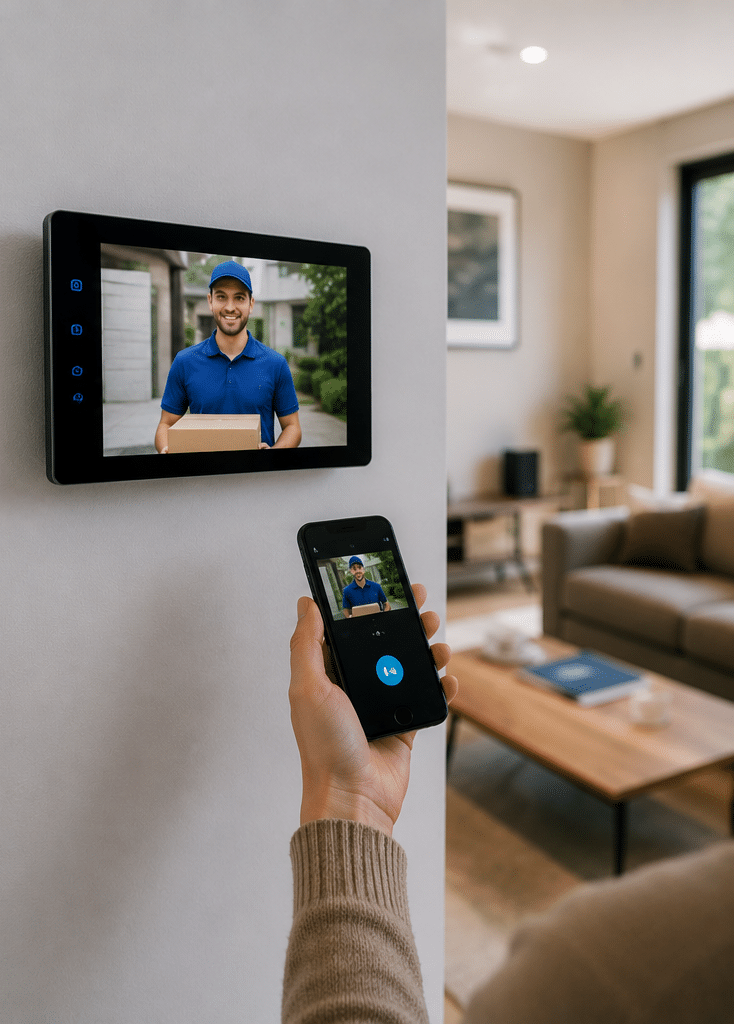
How Wireless Intercom Systems Work
Most wireless intercom systems use one of four communication methods.
First, some systems use radio frequency communication. These are often simple audio intercoms for homes, warehouses or small sites. They can work well over short to medium distances, although walls, steel structures and interference may affect performance.
Second, Wi-Fi intercoms connect to a local wireless network. These are popular for homes and small businesses because they can send calls to indoor monitors or mobile apps. However, their reliability depends on strong Wi-Fi at the door station or gate.
Third, 4G or mobile-network intercoms use a SIM card. These are useful for gates, rural entrances, temporary sites and places where fixed internet is not available. Nevertheless, they depend on mobile coverage and an active data or call plan.
Fourth, hybrid systems combine wireless communication with wired elements. For example, the door station may use Wi-Fi for app calling but still connect to a lock release, gate controller or power supply by cable.
From my experience, hybrid systems are often the most reliable for serious access points. They keep the user experience flexible while keeping critical door or gate functions stable.
Where Wireless Intercom Systems Make Sense
Wireless intercom systems suit many Australian properties, but they are not a universal answer.
For homes, they work well at front doors, pedestrian gates and driveway gates. They allow families to screen visitors, speak with couriers and open a gate without walking outside.
For apartments, they can support visitor calling, resident directories and mobile answering. However, apartment buildings need careful planning because user management, privacy, common-area access and body corporate approval can all affect the project.
For commercial premises, wireless intercom systems are useful at reception doors, loading docks, staff entrances and remote gates. They can reduce missed deliveries and improve entry control.
For warehouses and industrial sites, range and interference matter more. Metal cladding, concrete walls, forklifts, electrical equipment and long distances can reduce wireless performance. Therefore, a site test is important before final selection.
For rural properties, 4G intercoms may be more practical than Wi-Fi. Even so, mobile signal strength should be tested at the actual gate, not just near the house.
Wireless vs Wired Intercom Systems
Wireless intercom systems are attractive because they can be faster to deploy, but wired systems can still be better for high-traffic or high-security sites.
| Factor | Wireless intercom systems | Wired intercom systems |
| Installation disruption | Usually lower, especially where cabling is hard | Usually higher because cable routes are needed |
| Reliability | Depends on signal strength, power and network quality | Usually more stable when installed correctly |
| Best fit | Homes, small businesses, gates, retrofit projects | Apartments, commercial buildings, high-use entries |
| Remote answering | Common through mobile apps or cloud services | Also available on many IP systems |
| Maintenance | Network, batteries, SIM plans or Wi-Fi may need attention | Cable faults are less common but can be harder to trace |
| Upfront cost | Often lower for small sites | Often higher at installation stage |
| Long-term suitability | Good when the network is stable | Strong for demanding sites |
The right answer depends on the site. For example, a small office with one entry may do well with a Wi-Fi video intercom. However, a multi-level apartment building may need a more structured IP intercom design.
Key Features to Compare Before Buying Wireless Intercom Systems
Audio quality
Clear audio is essential. If users cannot hear visitors, they will stop trusting the system. Look for noise reduction, echo control and a weather-resistant outdoor station. This matters in Australia because many entrances face traffic noise, wind, rain or open car parks.
Video quality
Video intercoms help users confirm who is at the door. A wide-angle camera is useful at narrow entries. Night vision helps after dark. However, higher resolution is not always better if the network is weak. Good compression, lighting and camera placement can matter more than headline resolution.
Mobile app access
Many wireless intercom systems offer app calling. This is useful, but the app should be easy for non-technical users. Also, check whether multiple users can answer calls, whether call history is stored, and whether remote unlocking is controlled by permissions.
Lock or gate release
If the intercom will open a door or gate, confirm compatibility with the lock, gate motor or access-control system. A simple intercom call is one thing. Releasing a secured door is another. Therefore, this part should be reviewed carefully by a competent installer.
Power options
Some units use plug-in power. Others need low-voltage wiring. Battery-powered devices may be convenient, but batteries can become a maintenance problem. For busy entries, permanent power is usually better.
Weather resistance
Outdoor stations need suitable weather protection. Australian conditions can be harsh, with heat, storms, coastal air and direct sunlight. Look for a suitable IP weather rating and install the unit where rain and glare are managed.
User management
For apartments and businesses, user management is a major issue. You need to add, remove and update users without confusion. In my experience, a clean admin process is often more important than flashy features.
Integration with other systems
Some wireless intercom systems can integrate with access control, CCTV, alarms or building management systems. This is useful for businesses that want one security workflow. For tailored commercial advice, see integrated electronic security solutions for Australian properties.
Installation Checklist for Wireless Intercom Systems
Use this checklist before approving a system.
- Confirm the entry points that need visitor communication.
- Test Wi-Fi, radio or mobile signal strength at each outdoor station.
- Check whether the intercom needs to release a door, lift, roller door or gate.
- Confirm power availability at the installation point.
- Review weather exposure, lighting, glare and vandal resistance.
- Decide who will manage users, apps, PINs or call groups.
- Check whether cabling work requires a registered cabler.
- Document admin access, passwords and recovery details.
- Train users on answering, unlocking and reporting faults.
- Schedule periodic testing and firmware updates.
This process may look simple. However, it prevents many common problems. For instance, a gate intercom may work during testing but fail at peak times if mobile signal is weak. Likewise, a Wi-Fi model may work indoors but struggle once mounted on a brick pillar.
Wi-Fi, 4G and Range: What Australian Buyers Should Know
Wireless range claims can be misleading because they are often based on ideal conditions. Real Australian sites include double-brick walls, Colorbond fencing, concrete slabs, steel sheds, lifts, vehicles and electrical interference.
For Wi-Fi intercoms, test the actual signal at the door station. Do not assume the front door has strong Wi-Fi because the lounge room does. If the signal is weak, a mesh Wi-Fi node, outdoor access point or cabled network point may be needed.
For 4G intercoms, test mobile reception at the gate or entry. A phone test can help, although a dedicated device may perform differently. Also, consider ongoing SIM costs and the risk of service changes.
For radio-based intercoms, check distance and obstructions. They may work well across open space, but performance can drop through concrete or steel.
As a practical rule, wireless intercom systems are best treated as networked security devices, not simple doorbells. The network is part of the system.
Security Considerations for Wireless Intercom Systems
Security should be part of the buying decision from the start. A wireless intercom may connect to your Wi-Fi, mobile app, cloud service or access-control hardware. Therefore, weak setup can create risk.
The Australian Cyber Security Centre’s IoT guidance warns that many internet-connected devices used in homes and businesses can be vulnerable if they are not designed or managed securely. For wireless intercom systems, this means buyers should avoid default passwords, keep firmware updated and use strong account security.
Important security steps include:
- Change default usernames and passwords.
- Use multi-factor authentication where available.
- Keep firmware and mobile apps updated.
- Limit admin access to trusted people.
- Remove users when staff, tenants or contractors leave.
- Use secure Wi-Fi with strong encryption.
- Avoid sharing one generic app login across multiple people.
- Keep a record of who can unlock doors remotely.
For businesses and strata sites, user access should be reviewed regularly. Otherwise, old tenants, former staff or previous contractors may retain access longer than intended.
Privacy and Visitor Communication
Wireless intercom systems with video can collect images, audio, call logs and entry records. This can help with security, but it also creates privacy responsibilities.
The OAIC Australian Privacy Principles explain that the principles cover matters such as the collection, use and disclosure of personal information. For intercom users, this is a reminder to handle video, audio and personal details carefully.
In practical terms, businesses, strata committees and property managers should think about:
- What information is collected.
- Why it is collected.
- Who can access it.
- How long it is kept.
- Whether visitors and occupants are informed.
- How requests or complaints will be handled.
This is not legal advice. Instead, treat privacy as an administrative planning task. When in doubt, ask the relevant professional adviser, strata manager or compliance contact to review the process.
Apartment and Strata Considerations
Apartment intercom projects need more planning than single-home systems. A wireless intercom may sound simple, but the building may have shared entries, lifts, car parks, fire doors, resident directories and common property rules.
Before selecting wireless intercom systems for apartments, clarify:
- Who owns the entry hardware.
- Whether body corporate approval is required.
- How residents will be added and removed.
- Whether tenants and owners need different permissions.
- Whether the system integrates with lift access.
- Who pays for SIM plans, cloud subscriptions or app licences.
- What happens when a resident changes phone number.
From my experience, the biggest apartment issue is not the device. It is administration. A system can fail operationally if no one knows who manages the resident list.
Commercial Use Cases
Businesses often choose wireless intercom systems to improve entry control without hiring extra reception staff. They are useful for:
- Front doors after hours.
- Warehouses with locked pedestrian entries.
- Medical and professional suites.
- Childcare or education facilities.
- Storage facilities.
- Loading docks.
- Gated yards.
- Shared offices.
For commercial sites, the intercom should support a clear workflow. For example, a courier may press the call button, speak with reception, and receive access to a delivery area only. A staff member may use a mobile app after hours. A manager may review call logs after an incident.
However, avoid giving too many people unlock permission. More convenience can mean more risk. Therefore, permissions should match job roles.
Cost Factors for Wireless Intercom Systems in Australia
Costs vary widely. A simple residential audio unit may be relatively affordable. A video intercom with app access, gate release and professional installation will cost more. A multi-user apartment or commercial system can cost significantly more because of hardware, configuration and user management.
Key cost factors include:
- Number of entry stations.
- Audio-only vs video.
- Wi-Fi vs 4G vs hybrid design.
- Lock or gate integration.
- Power supply work.
- Cabling or registered cabler requirements.
- Cloud, SIM or licence fees.
- Number of users or apartments.
- Weatherproofing and vandal resistance.
- Ongoing support.
Any price estimate should be treated as site-dependent. The best approach is to assess the entry point, signal strength, power, locking hardware and user needs before comparing quotes.
Common Mistakes to Avoid
One common mistake is buying a consumer-grade doorbell for a commercial entry. It may work at first, but it may lack admin control, audit history, durable hardware or proper lock integration.
Another mistake is ignoring Wi-Fi strength. If the network is weak, the intercom may miss calls or delay video. This is frustrating for users and risky for entry control.
A third mistake is giving everyone the same login. This makes it hard to remove access later. Instead, use separate users where possible.
Also, avoid placing the camera where sunlight, headlights or reflections block the image. A good camera can still perform badly in the wrong position.
Finally, do not forget handover. Users should know how to answer calls, unlock doors, report faults and update app access.
Wireless Intercom Systems for Homes
For Australian homes, wireless intercom systems are often used at front gates and front doors. They are helpful when the home has a long driveway, pets, children or frequent deliveries.
A homeowner should focus on three things: reliable connection, simple app use and safe gate release. If the gate is far from the home, a 4G model may be better than Wi-Fi. However, if the gate has strong Wi-Fi from an outdoor access point, Wi-Fi can work well.
Video is useful, but it should not be the only feature you compare. Audio clarity, notifications and lock control are just as important.
Wireless Intercom Systems for Offices and Shops
For small offices and shops, wireless intercom systems can help manage visitors when staff are away from the front counter. They can also support after-hours deliveries or controlled staff entries.
However, businesses should avoid informal setups. A shared mobile phone or shared password may seem easy, but it can create problems when staff leave. Therefore, choose a system with proper user permissions.
Also, think about business continuity. If the internet goes down, can staff still open the door? If the app fails, is there a backup method? These questions matter before installation.
Wireless Intercom Systems for Gates
Gate intercoms need special attention. The unit may be exposed to rain, dust, insects, heat and vandalism. It may also sit far from the building network.
Before installing a wireless gate intercom, confirm:
- Power at the gate.
- Mobile or Wi-Fi signal strength.
- Gate motor compatibility.
- Safe release operation.
- Weather and sun exposure.
- Mounting height for drivers and pedestrians.
- Backup access method.
From my experience, many gate intercom problems come from poor signal testing. Always test at the final mounting point, not near the house or office.
Maintenance and Ongoing Management
Wireless intercom systems need ongoing care. Fortunately, this does not need to be complicated.
A good maintenance routine includes checking call quality, cleaning camera lenses, testing lock release, reviewing user access and applying updates. For 4G systems, also check SIM status and data plans. For battery-powered devices, schedule battery checks before they fail.
For strata and business sites, keep admin records. This includes installer details, warranty information, app admin accounts, user lists and configuration notes. Good records make future support much easier.
People Also Ask
Are wireless intercom systems reliable in Australia?
Yes, wireless intercom systems can be reliable when the signal, power and installation environment are checked properly. However, performance depends on Wi-Fi strength, mobile coverage, building materials and device quality.
Do wireless intercom systems need internet?
Some do, but not all. Wi-Fi and app-based systems usually need internet for remote calling, while some radio-based systems can work locally without internet. A 4G intercom uses mobile data or calls instead of fixed internet.
Can wireless intercom systems open a gate?
Yes, many wireless intercom systems can trigger a gate release when connected to compatible gate hardware. However, the installer should confirm compatibility, safety requirements and backup access before setup.
Are wireless intercom systems suitable for apartments?
They can be suitable for small apartment blocks or retrofit projects. However, larger buildings often need careful planning for resident directories, lift access, common property rules and user administration.
What is better, wired or wireless intercom?
Wired intercoms are often more stable for high-use buildings, while wireless intercom systems are usually more flexible for retrofits, gates and smaller sites. The better choice depends on the building, network and access-control needs.
Expert Q&A: Wireless Intercom Systems
1. How do I know if my Wi-Fi is strong enough for a wireless video intercom?
Test the signal at the exact mounting point while the door or gate is closed. Also test at busy times when the network is under load. If video freezes or calls arrive late, consider a Wi-Fi upgrade, outdoor access point or 4G alternative.
2. Can I install a wireless intercom myself?
Some simple plug-in models are designed for DIY setup. However, if the system connects to telecommunications cabling, fixed wiring, electric locks or gate hardware, you may need a qualified technician or registered cabler. This is a technical compliance matter, not legal advice.
3. What happens if the internet goes down?
It depends on the system. Some app-based intercoms may lose remote calling if the internet fails. Therefore, important entries should have a backup access method, such as a key, keypad, fob, local release button or alternative authorised process.
4. Are cloud-based wireless intercom systems safe?
They can be safe when the provider uses strong security practices and the owner manages accounts properly. Look for unique passwords, multi-factor authentication, firmware updates, user permissions and clear data handling. Avoid devices that rely on default or shared logins.
5. How often should wireless intercom systems be reviewed?
For homes, review settings at least once or twice a year. For businesses and strata buildings, review users whenever staff, tenants or contractors change. Also test the system after network changes, gate repairs or app updates.
Conclusion
Wireless intercom systems can make Australian homes, apartments and businesses easier to manage, especially where cabling is difficult or remote answering is useful. However, the best system is not simply the newest device. It is the one that suits the entry point, wireless coverage, access-control needs, privacy expectations and maintenance process.
Before you buy, test the signal, confirm power, review user management and check whether any cabling or lock work needs a qualified installer. Also, plan how users will be added, removed and supported over time.
For a practical next step, speak with a security specialist who can assess your site, compare suitable options and design a reliable entry workflow for your property.