


Access control installation is one of the most effective ways for Australian businesses to manage who can enter offices, warehouses, schools, medical suites, apartment buildings and restricted areas. From my experience working around commercial security planning, the best installations are not just about putting a reader beside a door. They start with risk, workflow, staff movement, emergency access, privacy, future expansion and reliable aftercare.
For many Australian organisations, keys are no longer enough. Physical keys can be copied, lost or kept by former staff. In contrast, modern access control can remove a user in minutes, create audit trails, support zones and integrate with CCTV, alarms or intercoms. However, the system must be designed correctly. A poor installation can create bottlenecks, lockout issues or compliance headaches.
Table of Contents
- What is access control installation?
- Why Australian businesses install access control
- How access control systems work
- Types of access control installation options
- Planning an access control installation in Australia
- Installation process: step-by-step checklist
- Onsite vs remote-managed access control comparison
- Compliance and administrative considerations
- Common access control installation mistakes
- People Also Ask
- Expert Q&A
- Conclusion
What Is Access Control Installation?
Access control installation is the process of designing, wiring, configuring and testing a system that controls who can enter a building, room or secure area. In Australia, it usually includes door hardware, readers, credentials, controllers, software, user permissions, emergency exit functions and ongoing maintenance.
Why Access Control Installation Matters for Australian Businesses
Access control installation gives a business more control over people, property and risk. Instead of handing out keys, managers can assign credentials to staff, contractors or tenants. Then, when someone leaves, access can be removed without changing locks.
This matters in Australia because many workplaces now operate with flexible hours, hybrid teams and shared spaces. For example, a Melbourne office may need staff access after hours. A Sydney warehouse may need contractor access only during a delivery window. A Brisbane medical clinic may need different permissions for reception, treatment rooms and medicine storage.
Good access control installation helps with:
- Reducing unauthorised entry
- Limiting access to sensitive areas
- Managing staff and contractor permissions
- Supporting after-hours entry
- Creating audit records
- Improving emergency response
- Reducing reliance on physical keys
- Integrating with CCTV or alarms
However, access control is not a magic fix. It must match the building, the users and the business process. For example, a single-door office needs a simpler setup than a multi-level commercial property with lifts, car parks and tenancy zones.
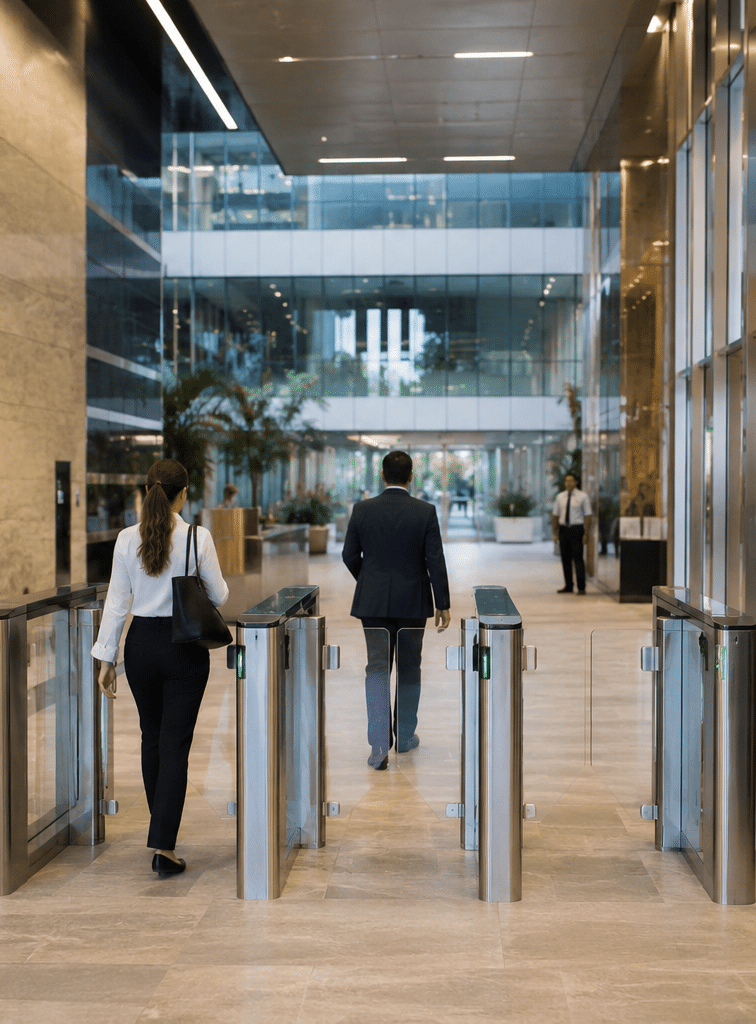
How Access Control Systems Work
Most access control systems use four main layers.
First, there is the credential. This may be a swipe card, fob, PIN, mobile credential, biometric identifier or QR code. The credential identifies the person or device requesting entry.
Second, there is the reader. This is the device at the door or gate. It reads the credential and sends the request to the controller or cloud platform.
Third, there is the controller or management software. This checks whether the user has permission to enter that door at that time.
Finally, there is the locking hardware. This may include an electric strike, magnetic lock, drop bolt, gate motor interface or electronic lock. If access is approved, the lock releases.
A professional access control installation also considers request-to-exit buttons, emergency break-glass units where required, door position sensors, power supplies, battery backup and fire-system interaction. These details matter because the system must be secure, safe and usable.
Types of Access Control Installation Options
Card and Fob Access Control Installation
Card and fob systems are common in Australian offices, warehouses and apartment buildings. They are simple for users and easy for managers to update.
The main benefit is convenience. If a staff member loses a fob, the administrator can disable it. This is much easier than replacing locks. However, businesses should use modern credential technology where possible, because older proximity cards may be easier to clone.
PIN-Based Access Control
PIN keypads are useful for low-risk doors, plant rooms and shared facilities. They are affordable and simple. However, PINs can be shared, guessed or seen by others.
For that reason, PIN access works best when combined with another credential, such as a card and PIN. This is especially useful for areas that need stronger verification.
Mobile Access Control
Mobile access uses a smartphone as the credential. It can be convenient for modern offices and co-working spaces. It can also reduce the need to issue physical cards.
However, mobile credentials depend on phone compatibility, app setup, battery life and user training. Therefore, businesses should keep a backup method for visitors, emergency use and staff who cannot use mobile access.
Biometric Access Control
Biometric systems use features such as fingerprints or facial recognition. They can be useful for high-security areas because the credential is linked to the person.
However, biometric access control needs careful privacy review. The Office of the Australian Information Commissioner explains that biometric scanning involves taking an electronic copy of biometric information. Businesses should treat this as a privacy-sensitive decision, not just a technology upgrade. You can review general privacy guidance from the Office of the Australian Information Commissioner.
Cloud-Based Access Control
Cloud-based access control allows authorised managers to update users, doors and schedules through an online platform. This can be helpful for businesses with multiple sites across Australia.
The benefits include easier remote administration, software updates and central reporting. However, because internet-connected platforms add cyber risk, account security matters. The Australian Cyber Security Centre recommends the Essential Eight as a baseline set of mitigation strategies for improving cyber resilience. Access control administrators should pay special attention to strong passwords, multi-factor authentication and access permissions. See the Australian Cyber Security Centre Essential Eight for general cyber-security guidance.
On-Premise Access Control
On-premise systems store the management software and controllers locally. This can suit organisations that want direct control over infrastructure or have strict network policies.
However, on-premise systems still need maintenance. Updates, backups and administrator access should not be ignored. Otherwise, the system can become outdated or difficult to manage.
Planning Access Control Installation in Australia
Good access control installation starts with a site assessment. This is where the installer or security consultant reviews the building, door types, user groups, traffic flow and risk areas.
From my experience, this stage is where many problems can be prevented. For example, a glass door may need different locking hardware from a timber office door. A fire exit door may need special consideration. A warehouse roller door may require integration with a motor controller. A lift access project may need coordination with the lift contractor.
Before installation, clarify:
- Which doors, gates, lifts or rooms need access control?
- Who needs access?
- When do they need access?
- What happens after hours?
- How are visitors handled?
- Who approves new users?
- Who removes former staff?
- What audit reports are needed?
- Should the system integrate with CCTV, alarms or intercoms?
- What backup process applies during power or network failure?
A clear plan saves money because it reduces rework. It also improves adoption because staff understand how the system fits their day-to-day routine.
Choosing the Right Access Control Installer
In Australia, security licensing rules vary by state and territory. Industry bodies such as ASIAL explain that licensing requirements can differ depending on the jurisdiction and the type of security work. As an administrative step, businesses should check that their provider is appropriately licensed for the work in their location. ASIAL provides a useful overview of security licensing in Australia.
This is not legal advice. It is a practical procurement step. If your project involves regulated security work, privacy-sensitive technology or building compliance issues, get the relevant licensed professional or legal adviser to review it.
When assessing an installer, ask about:
- State or territory licensing
- Experience with similar buildings
- Supported brands and platforms
- Warranty terms
- Maintenance options
- Emergency support
- Cyber-security settings
- Documentation handover
- Training for administrators
- Future expansion options
A good installer should explain trade-offs clearly. For example, they should tell you when a cheaper reader is enough and when a higher-grade credential is worth the cost.
Access Control Installation Process: Numbered Checklist
Use this checklist as a practical guide before and during the project.
- Define the security goal
Decide whether the main goal is staff access, visitor control, asset protection, compliance support, after-hours access or all of these. - Map doors and zones
List every door, gate, lift, car park entry and restricted room. Then group them into access zones. - Identify user groups
Separate staff, managers, cleaners, contractors, visitors, tenants and emergency users. - Set access schedules
Decide which users can enter each zone and at what times. This prevents over-permissioning. - Review door hardware
Check door material, frame type, lock type, fire rating, exit path and cable routes. - Choose credentials
Select cards, fobs, mobile access, PINs or biometrics based on risk, convenience and privacy needs. - Plan network and power
Confirm power supply, backup battery, controller location, network ports and internet access if cloud-managed. - Confirm compliance administration
Check licensing, privacy notices, staff consultation needs, records management and internal approvals. - Install and cable equipment
Fit locks, readers, controllers, sensors and exit devices. Keep cabling neat and labelled. - Configure software
Add doors, schedules, user roles, administrator accounts and alert settings. - Test every scenario
Test normal entry, denied access, emergency exit, after-hours access, power loss and administrator changes. - Train administrators
Show managers how to add users, remove access, run reports and respond to alerts. - Document the system
Keep as-built drawings, device lists, warranty details, admin procedures and support contacts. - Schedule maintenance
Plan regular checks for locks, readers, batteries, software updates and user permissions.
Onsite vs Remote-Managed Access Control
Both onsite and remote-managed access control can work well. The right choice depends on the organisation.
| Feature | Onsite Access Control | Remote-Managed / Cloud Access Control |
| Best suited for | Single sites, strict local control, stable user lists | Multi-site businesses, flexible teams, frequent user changes |
| Administration | Usually managed from local software or server | Managed through a secure online dashboard |
| Internet dependence | Often lower, depending on design | Usually higher for remote changes and reporting |
| Scalability | Can scale, but may need more local infrastructure | Often easier to scale across locations |
| Cyber-security focus | Local network and server hardening | Account security, MFA, vendor controls and permissions |
| Maintenance | Local updates and backups may be needed | Vendor updates may be included, depending on platform |
| Practical example | A private office with ten staff | A national business with sites in Sydney, Melbourne and Brisbane |
The main point is not that one is always better. Instead, the system should match your risk profile, IT resources and management style.
Cost Factors for Access Control Installation
Access control installation costs vary because every building is different. A basic single-door installation is far simpler than a multi-door site with lift access, intercoms, alarms and after-hours schedules.
Common cost factors include:
- Number of doors
- Type of locking hardware
- Reader and credential type
- Cable distance and access
- Door condition
- Fire and exit requirements
- Controller capacity
- Cloud licence fees
- Integration with CCTV or alarms
- Administrator training
- Maintenance agreement
As a clear estimate, small single-door commercial projects may cost much less than complex multi-door systems. However, the cheapest quote is not always the best value. Poor hardware, messy cabling or weak configuration can cost more later through faults and rework.
Compliance and Administrative Considerations
Access control installation can involve licensing, privacy, workplace and building administration. These items should be treated as project requirements, not afterthoughts.
For example, if the system records entry logs, decide who can view those logs and how long they are retained. If biometric access is proposed, review whether it is necessary, proportionate and properly communicated. If CCTV integration is included, ensure signage, internal policies and access controls are considered.
In practical terms, Australian businesses should review:
- Security provider licensing for the relevant state or territory
- Privacy notices for staff, visitors or tenants
- Biometric data handling where applicable
- Administrator permissions
- Log retention and access
- Fire exit and emergency egress requirements
- Contractor induction and site safety
- Change management for staff
Again, this is not legal advice. It is a practical checklist for project planning. For regulated or complex sites, have the relevant licensed professional review the design.
Why Access Control Installation Should Be Designed Around People
Technology only works when people use it correctly. Therefore, access control installation should consider the daily experience of staff, visitors and managers.
For example, a busy office entrance needs fast authentication. If the reader is too slow, people may tailgate through the door. A warehouse gate needs durable hardware. If dust, rain or impact damage is likely, commercial-grade equipment matters. A shared tenancy building needs clear rules for onboarding and offboarding users.
From my experience, the best results happen when security and convenience are balanced. If the system is too loose, it does not reduce risk. However, if it is too difficult, users find workarounds.
Access Control Installation for Offices
Office access control usually focuses on front doors, meeting areas, server rooms, storage rooms and staff-only spaces. Many Australian offices also need after-hours access for cleaners and contractors.
A good office setup may include:
- Card or mobile access at the main entry
- Restricted access to server or communications rooms
- Time-based access for cleaners
- Visitor sign-in process
- Audit logs for sensitive doors
- Integration with an alarm system
For offices, user management is often the biggest long-term task. Therefore, someone should own the process for adding, changing and removing access.
Access Control Installation for Warehouses and Industrial Sites
Warehouses and industrial sites need a stronger focus on durability, traffic flow and safety. Roller doors, vehicle gates, loading docks and pedestrian entries may all need different treatments.
For example, a forklift area may need controlled pedestrian access. A delivery gate may need scheduled contractor permissions. A stock room may need restricted access for supervisors only.
Because industrial environments are harsher, choose hardware that suits dust, heat, vibration and weather exposure. Also, make sure emergency exits remain compliant and easy to use.
Access Control Installation for Apartments and Strata Buildings
Apartment and strata buildings often need access control for foyers, lifts, car parks, common rooms, gyms and service areas.
The challenge is user turnover. Residents move in and out. Contractors need temporary access. Building managers need simple administration. Therefore, the system should make credential management easy.
Strata committees should also consider privacy and governance. For example, decide who can access entry logs and under what circumstances.
Access Control Installation for Healthcare and Professional Suites
Medical, dental and professional suites often need controlled access to reception areas, treatment rooms, file storage and medicine rooms.
In these settings, access control supports confidentiality and asset protection. However, it must not block safe movement during emergencies. Therefore, installation should be planned with building requirements and daily workflows in mind.
Integrating Access Control with CCTV, Alarms and Intercoms
Access control becomes more useful when it works with other systems. For example, when a door is forced open, the system can trigger an alarm event. CCTV can help verify what happened. An intercom can allow reception to release a door for visitors.
Common integrations include:
- CCTV event bookmarking
- Alarm arming and disarming
- Video intercom entry
- Lift destination control
- Visitor management platforms
- Duress or emergency alerts
However, integration should be planned carefully. Too many alerts can create noise. Also, integrations can increase complexity. As a result, they should support clear business outcomes.
Common Access Control Installation Mistakes
Choosing Hardware Before Defining Risk
Many businesses start by asking for a product. However, the better first question is: “What risk are we trying to manage?” Once the risk is clear, the hardware choice becomes easier.
Ignoring User Offboarding
Access control is only effective if former staff and contractors are removed quickly. Therefore, offboarding should be part of HR or contractor management.
Using Shared Admin Logins
Shared administrator accounts reduce accountability. Instead, each administrator should have their own login with the right permission level.
Forgetting Battery Backup
Power failures happen. Battery backup helps keep the system working long enough to support safe operation.
Poor Door Hardware Assessment
Not every lock suits every door. For example, glass doors, fire doors and external gates need different hardware. A proper site inspection prevents avoidable problems.
No Training After Installation
If administrators are not trained, the system may be misused. Training should cover user setup, reports, emergency steps and support procedures.
How to Get More Value from Access Control Installation
To get the best return from access control installation, treat it as an operational system, not a one-time purchase.
Review access levels every few months. Remove inactive users. Check door events for unusual patterns. Update administrator permissions when staff roles change. Test emergency exit functions. Replace failing batteries before they create faults.
Also, keep documentation current. If the business expands, accurate records make upgrades easier and cheaper.
People Also Ask: Access Control Installation in Australia
How much does access control installation cost in Australia?
Costs vary based on the number of doors, hardware, cabling, credentials and software. A single-door installation is usually much simpler than a multi-site system with lifts, gates and CCTV integration. For an accurate figure, arrange a site assessment.
Do I need a licensed installer for access control installation?
In many Australian jurisdictions, security equipment work may require appropriate licensing. Requirements vary by state and territory, so businesses should check the relevant regulator or ask the provider to confirm their licence details.
What is the best access control system for a small office?
For many small offices, card, fob or mobile access is enough. The best choice depends on staff numbers, after-hours access, budget, door type and whether remote management is needed.
Can access control work with CCTV?
Yes, many systems can integrate with CCTV. This can help match door events with video footage, such as forced-door events or denied-access attempts.
Is biometric access control legal in Australia?
Biometric access may be possible, but it needs careful privacy review. Businesses should assess necessity, consent, notices, data handling and retention before using biometric systems.
Expert Q&A: High-Value Questions About Access Control Installation
1. What should be included in an access control installation quote?
A good quote should include hardware, software, credentials, cabling, labour, commissioning, training, warranty and maintenance options. It should also state assumptions, exclusions and whether any third-party work is needed.
2. How long does access control installation take?
A simple single-door project may be completed faster than a multi-door installation. However, timing depends on site access, cabling complexity, hardware availability, approvals and integration needs.
3. Can access control systems keep working during internet outages?
Many systems can continue basic door decisions locally, depending on design. However, cloud dashboards, remote changes and reporting may be limited until the connection returns. Ask the installer how the chosen system behaves during outages.
4. How often should access permissions be reviewed?
For most businesses, a quarterly review is a practical starting point. However, high-turnover or higher-risk sites may need monthly reviews. Access should also be updated immediately when staff leave or roles change.
5. What is the biggest hidden risk in access control installation?
The biggest hidden risk is poor administration after installation. Even a strong system can fail if old users remain active, admin accounts are shared or access levels are too broad.
Conclusion
Access control installation can make Australian workplaces safer, easier to manage and less dependent on physical keys. However, the best outcome comes from careful planning. The system should match the building, the people, the risks and the way the organisation works.
Start with a clear site assessment. Then choose hardware, credentials and software that support daily operations. Also, consider licensing, privacy administration, cyber-security and maintenance from the beginning.
For practical help planning a secure and scalable system, speak with experienced access control and security system specialists in Australia.